
Download DVD Identifier – DVD, disc, format, information, burning, speed, capacity, producer, writer, tool, utility, data, analysis, identification
Overview
DVD Identifier is a specialized utility designed for users who work with physical optical media, particularly DVDs. Its primary purpose is to provide immediate access to detailed technical and manufacturer-specific information about inserted DVDs. By analyzing the disc’s metadata, the tool delivers insights into format type, capacity, supported burning speeds, and producer details.
This functionality is especially valuable for users managing large media libraries, professionals in video production, or hobbyists involved in disc authoring and archival work. The app solves a common pain point: the inability to quickly determine a disc’s specifications without external tools or manual research. It streamlines the process of identifying the right DVD writer for specific tasks by offering real-time data upon disc insertion.
Although the developer did not provide additional background on the team or company, the app’s longevity since its release in 2009 suggests consistent reliability. The tool operates as a standalone utility, requiring no installation of additional drivers or software components. Its niche focus makes it a dependable companion in workflows involving disc duplication, media conversion, or quality assurance.
Despite being developed over a decade ago, DVD Identifier remains relevant in an ecosystem where physical media still plays a role in data preservation and content distribution.
Key Features & Functionality
- Comprehensive Format Support: The app recognizes and identifies multiple DVD formats including DVD+R, DVD-R, DVD+RW, DVD-RW, and DVD-RAM. This broad compatibility ensures users can analyze nearly any standard DVD, regardless of its write-once or rewritable nature.
- Instant Analysis upon Insertion: Once a disc is inserted into the optical drive, DVD Identifier automatically begins its analysis. The process is seamless and requires no user intervention, delivering results within seconds.
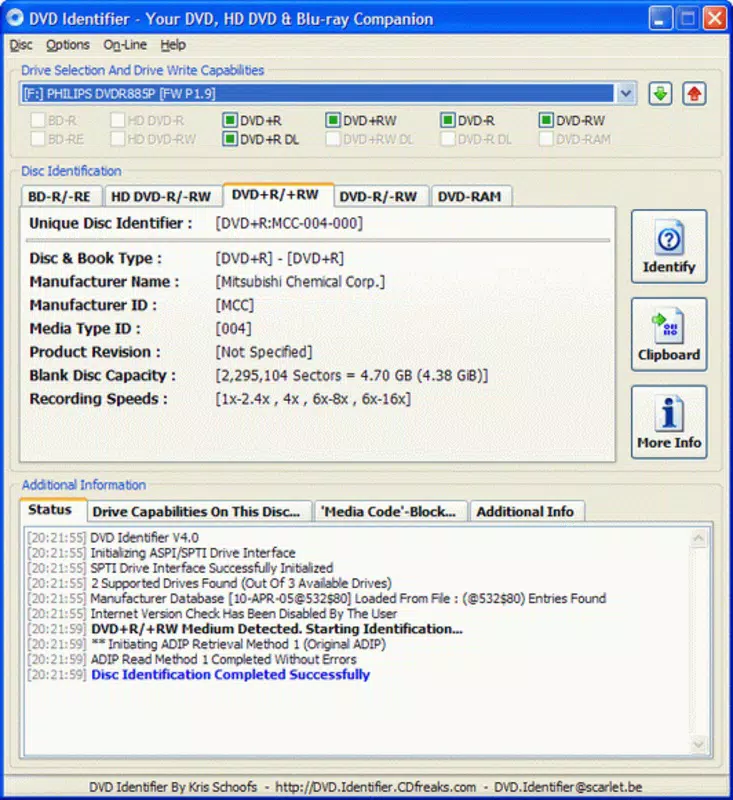
- Detailed Producer Information: The tool retrieves the manufacturer’s name and model of the disc, enabling users to assess quality, longevity, and compatibility with specific burning devices.
- Supported Burning Speeds: It displays the maximum and recommended burning speeds supported by the disc. This helps users avoid errors during data writing by selecting optimal settings for their DVD writer.
- User-Friendly Interface: The interface is designed for clarity and ease of use. Even users with minimal technical experience can navigate the application and interpret the data presented.
For example, a filmmaker preparing to archive a project can insert a blank DVD and immediately verify its format and maximum write speed before starting the burn process. Similarly, a data archivist managing a collection of legacy media can use the tool to categorize discs by manufacturer and format, improving inventory accuracy and workflow efficiency.
Interface, UX & Performance
DVD Identifier features a minimalistic and functional user interface, optimized for quick access to essential data. The layout is clean, with clearly labeled sections displaying format, capacity, producer, and supported speeds. Navigation is straightforward—users simply insert a disc and wait for the tool to analyze it.
The application responds promptly after disc insertion, with no noticeable lag or delay. Although the developer did not list formal performance metrics, the app’s lightweight design (1.2 MB) suggests efficient resource usage. It runs smoothly on older systems without consuming excessive memory or CPU.
The interface remains responsive across various screen sizes and resolutions, though specific compatibility details were not disclosed. Stability appears to be consistent, given the app’s long-standing presence without reported major bugs. The lack of advanced customization options reflects its focused purpose: to deliver accurate data quickly.
There are no in-app advertisements or unnecessary features, which enhances the user experience. Overall, the app maintains a high level of usability and reliability for its intended audience.
Platform Compatibility & Technical Requirements
DVD Identifier is available exclusively for the Windows platform. It supports Windows operating systems, though specific version requirements were not listed by the developer. The application has a file size of 1.2 MB, indicating a lightweight footprint suitable for systems with limited storage.
The latest version is 2.2.0, released on August 17, 2009. As the app has not seen a recent update, users should be aware that compatibility with newer Windows versions or modern optical drives may vary. The developer did not specify minimum OS requirements, so installation on newer systems should be approached with caution.
Additionally, the app requires an optical drive to function, as it relies on hardware-level access to read disc metadata. Without a compatible drive, the tool cannot perform its core function. While it may run on current Windows systems through compatibility modes, this is not guaranteed.
Users are advised to test the app in a safe environment before relying on it for critical tasks.
Pros and Cons
Pros
- Lightweight design at just 1.2 MB, minimizing system impact
- Free to download and use, with no in-app purchases or ads
- Immediate analysis upon disc insertion, saving time during workflow
- Supports a wide range of DVD formats, enhancing versatility
- Clear, intuitive interface suitable for non-technical users
Cons
- Released in 2009, with no updates since, raising compatibility concerns
- Platform limited to Windows, with no support for macOS or Linux
- Requires an optical drive to function, limiting use on modern laptops
- Developer did not provide detailed system requirements or compatibility notes
- No mobile or cloud-based version available
FAQ
Is DVD Identifier safe to download and install?
Yes, the app is free and does not include malware or unwanted software. It operates as a standalone utility with no background processes.
Can I use DVD Identifier on Windows 11 or Windows 10?
While the app was released in 2009, it may run on Windows 10 and 11 via compatibility mode. However, the developer did not confirm official support for these systems.
Does DVD Identifier work on laptops without optical drives?
No, the tool requires an optical drive to read disc metadata. It cannot function on laptops or systems without a physical disc drive.
Is the app available for Android or iOS?
No, DVD Identifier is currently only available for Windows. There is no mobile version for Android or iOS.
How often is DVD Identifier updated?
The latest version, 2.2.0, was released on August 17, 2009. The developer has not issued any updates since then.
Final Thoughts
DVD Identifier remains a dependable tool for users who work with physical DVDs and need quick access to disc metadata. Its ability to instantly identify format, capacity, burning speeds, and producer details makes it invaluable for professionals and enthusiasts alike. Despite its age and lack of updates, its lightweight design and focused functionality continue to serve its niche audience effectively.
The absence of ads, cost, and complex setup adds to its appeal. However, users should consider the limitations—especially the need for an optical drive and potential compatibility issues on modern systems. For those managing legacy media, archiving projects, or working in video production, DVD Identifier offers a simple, efficient solution.
Its enduring relevance is a testament to its core utility. Download DVD Identifier now.


